U-Poser ® Reference and Help Guide

    Web Site Updated 2-19-2011
    Current U-Poser version 2.5.4


Home
Overview
Size/Shape
Setup 0
Setup 1
Setup 2
Setup 3
Setup 4
Setup 5
Setup 6
Setup 7
Setup 8
Setup 9
Save
Load
Misc
Advanced
Pose
Player (Animation)
Options
Mannequin
Advanced
Downloads
Help
SIZE/SHAPE >> SAVE

Once you have completed adjustments to the Mannequin click SAVE AV and click OK on the HUD.


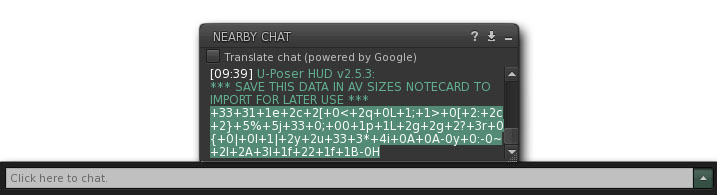
Data will output to nearby chat log/history (you may have to click the "shows/hides nearby chat log" button).


Highlight only the data as shown below. Press Ctrl-C (Command-C for Mac) to copy the data to the clipboard.


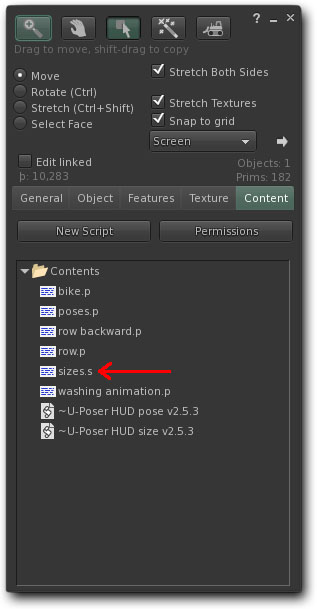
Right click the HUD (Command-click for Mac) and select Edit which opens the build window (this may take a few seconds). Click the Content tab in the build window to see a list of notecards and scripts. There are two types of notecards: those ending in ".s" (size data) and those ending in ".p" (pose backup data).


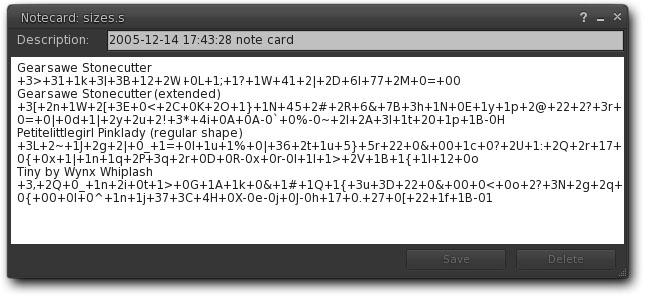
For this example open the "size.s" notecard. Right click (Command-click for Mac) and select Open. One line is the description (usually the Avatar's name) and the next line is the size data. Important: Follow this format exactly or the script cannot read the data correctly. Click Save in the notecard and close it. The data can then be recalled for future use. Important: You can always add more notecards either by creating a new one in your inventory or by clicking the New Note button on the Options side of the HUD.


NEXT Loading

©Copyright 2011 U-Poser. All rights reserved. No part of this document may be reproduced without permission of U-Poser creator. Second Life, SL, and inSL are trademarks of Linden Research, Inc. U-Poser is not affiliated with or sponsored by Linden Research. Mac and Mac OS are trademarks of Apple Inc., registered in the U.S. and other countries. Windows is a registered trademark of Microsoft Corporation in the United States and other countries. All products are trademarks of their respective companies. Specifications subject to change without notice.