U-Poser ® Reference and Help Guide

    Web Site Updated 2-19-2011
    Current U-Poser version 2.5.4


Home
Overview
Size/Shape
Pose
Player (Animation)
Assembly
Load
Save Backup
Create (Animated) BVH File
Uploading
Options
Mannequin
Advanced
Downloads
Help
PLAYER (ANIMATION) >> ASSEMBLY


To create an animation begin by creating a single pose on the POSE side of the HUD then click PLAYER. Click either one of the blue buttons:
-Click INSERT>> to add a frame after the currently viewed frame; or
-Click INSERT<< to add a frame before the currently viewed frame
To insert another frame click BACK, adjust the Mannequin, and click PLAYER. Take this opportunity to preview the frame by clicking between BACK and PLAYER. Once satisfied with result insert the frame by clicking INSERT>> or INSERT<<.

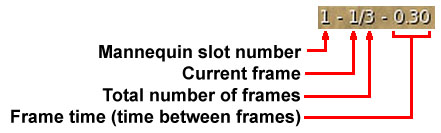
Above the BACK button is a set of numbers. For example:


Cycle through the frames by clicking or holding STEP>> to go forward or STEP<< to go backward. A single click will cycle by one frame. Holding STEP>> will play the animation forward or STEP<< will play the animation backward by the set frame time. Frame time may be adjusted by clicking or holding the up/down arrows alongside the STEP buttons. A single click will adjust the frame time by 0.01 seconds; holding down the arrow will adjust it by 0.1 seconds.

When making animations using multiple Mannequins the ALL button may be toggled (green when on) to cycle through the animation for all active Mannequins. The current selected Mannequin will determine which frames are played for the other unselected Mannequins (refer to Advanced>>Multiple Mannequins). Leave the ALL button inactive (red when off) when working with only one Mannequin.

Click DELETE then OK to remove the current frame. Click DELETE ALL then OK to remove all frames from memory for the active Mannequin. Click EDIT then OK to switch to the POSE side for editing the current frame. Once you have edited the frame you can switch back to the PLAYER side, click REPLACE then OK to swap out the current frame with the newly edited frame.

©Copyright 2011 U-Poser. All rights reserved. No part of this document may be reproduced without permission of U-Poser creator. Second Life, SL, and inSL are trademarks of Linden Research, Inc. U-Poser is not affiliated with or sponsored by Linden Research. Mac and Mac OS are trademarks of Apple Inc., registered in the U.S. and other countries. Windows is a registered trademark of Microsoft Corporation in the United States and other countries. All products are trademarks of their respective companies. Specifications subject to change without notice.