U-Poser ® Reference and Help Guide

    Web Site Updated 2-19-2011
    Current U-Poser version 2.5.4


Home
Overview
Size/Shape
Pose
Player (Animation)
Assembly
Load
Save Backup
Create (Animated) BVH File
Uploading
Options
Mannequin
Advanced
Downloads
Help
PLAYER (ANIMATION) >> SAVE BACKUP DATA

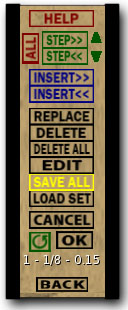
For this example load the "bike.p" animation. Click SAVE SET and OK.


Data will be output to nearby chat. Highlight "Frame1" down to the last line containing numbers and symbols as shown below. Press Ctrl-C (Command-C for Mac) to copy the data to the clipboard.


Right click the HUD (Command-click for Mac) and select Edit which opens the build window (this may take a few seconds). Click the Content tab in the build window to see a list of notecards and scripts then double click the notecard named "bike.p" to open.


Since the entire notecard loads only one animation set per notecard should be saved. The opened notecard is formatted the same as a typical pose notecard that includes a description line and a line of data. If changes are made select all data in the notecard and paste to replace it and click save.


©Copyright 2011 U-Poser. All rights reserved. No part of this document may be reproduced without permission of U-Poser creator. Second Life, SL, and inSL are trademarks of Linden Research, Inc. U-Poser is not affiliated with or sponsored by Linden Research. Mac and Mac OS are trademarks of Apple Inc., registered in the U.S. and other countries. Windows is a registered trademark of Microsoft Corporation in the United States and other countries. All products are trademarks of their respective companies. Specifications subject to change without notice.