|
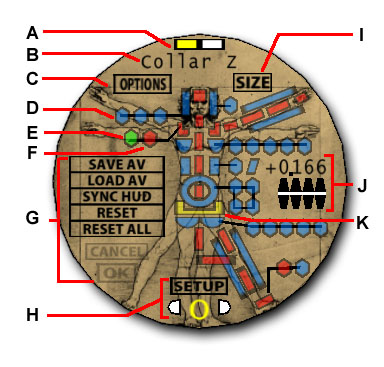
SIZE/SHAPE
A. Current color scheme of the controlled Mannequin
B. Name of the current selected limb or Mannequin part
C. Switches to OPTIONS side of the HUD
D. Advanced secondary sizing buttons are colored in blue
E. Green button indicates selected limb
F. Primary sizing button shown in red
G. Allows you to SAVE, LOAD, SYNC and RESET data in the HUD's memory. All choices require user confirmation
H. Chooses and displays the setup pose in sizing process
I. Switches to the POSE side of the HUD
J. Increases/decreases the values of the selected limb or body part
K. Limbs to be adjusted for the current setup are highlighted in yellow
|
|
|
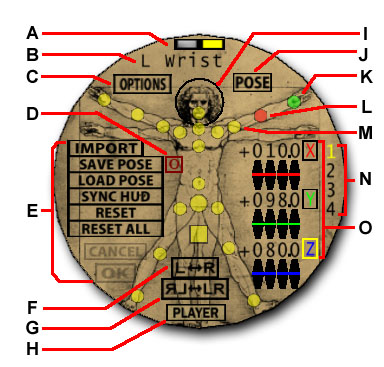
POSE
A. Current color scheme of the controlled Mannequin
B. Name of selected joint
C. Switches to OPTIONS side of the HUD
D. Toggles zero frame on web output
E. Allows you to IMPORT, SAVE, LOAD, SYNC and RESET data in the HUD's memory. All choices require user confirmation
F. Mirrors joint values to other half of Mannequin
G. Mirrors entire pose from left side of Mannequin to right side of Mannequin
H. Switches to the (ANIMATION) PLAYER side of the HUD
I. Click head to minimize/maximize HUD
J. Switches to the SIZE side of the HUD
K. Selected joint is shown in green
L. Joints having at least one axis not zero is shown in red
M. Joints having zero values for three axes is shown in yellow
N. Mannequin slot number
O. Adjusts the selected joint:
|
|
-Clicking arrows will increase/decrease values
-Clicking and holding the numbers while moving mouse up and down will increase/decrease values
-Selecting X, Y, or Z will allow parametric expression entries
|
|
|
|
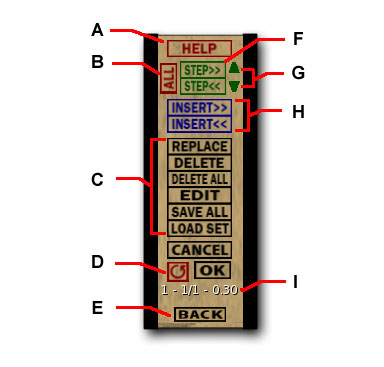
(ANIMATION) PLAYER
A. Links to Reference and Help Guide
B. Toggles to animate all active Mannequins
C. Used to REPLACE, DELETE, EDIT, SAVE SET and LOAD SET. All choices require user confirmation
D. Toggles to create a loop animation when saving
E. Returns to POSE side of the HUD
F. Hold to play steps forward/backward in animation (single click for one frame)
G. Increases/decreases frame time
H. Inserts a frame before/after current frame from POSE side
I. Displays selected Mannequin slot number - current frame/total frames - frame time
|
|
|
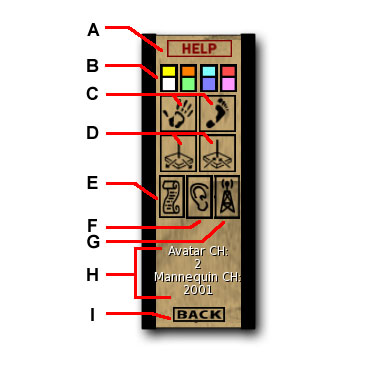
OPTIONS
A. Links to Reference and Help Guide
B. Four-color scheme for the active Mannequin
C. Rezzes hand/foot reference
D. Increase/decrease the ground reference size
E. Creates a new notecard (new file) in the HUD's content
F. Changes the Avatar chat channel
G. Changes the Mannequin communication channel
H. Displays current Avatar chat and Mannequin communication channels
I. Returns to the last POSE/SIZE side of the HUD
|
|
|
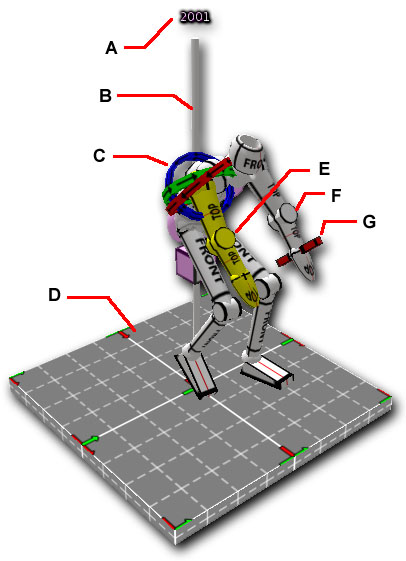
MANNEQUIN
A. Channel used by Mannequin
B. Left click pole to open Mannequin menu
C. Click and hold axis ring and drag mouse up/down to increase/decrease value
D. Ground reference also used to open Mannequin menu
E. Yellow is default for selected body parts
F. White is default for unselected body parts. (White is the default for unselected color)
G. Attachment prim used to attach objects to the Mannequin
|
|


