U-Poser ® Reference and Help Guide

    Web Site Updated 2-19-2011
    Current U-Poser version 2.5.4


Home
Overview
Size/Shape
Setup 0
Setup 1
Setup 2
Setup 3
Setup 4
Setup 5
Setup 6
Setup 7
Setup 8
Setup 9
Save
Load
Misc
Advanced
Pose
Player (Animation)
Options
Mannequin
Advanced
Downloads
Help
SIZE/SHAPE >> SETUP 1

Setup 1 - 1
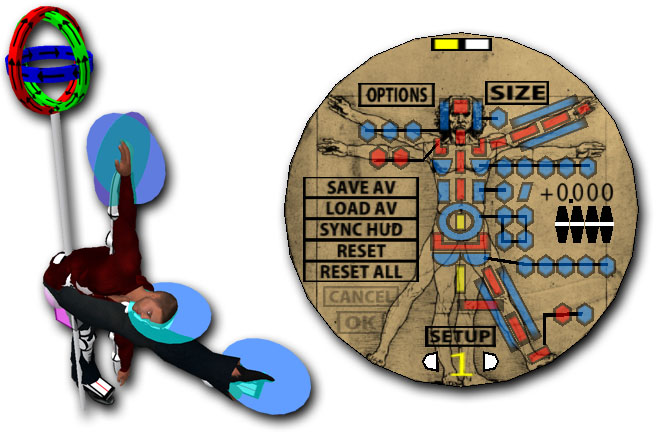
Sizing the mannequin for Root and Hip Length is one the more difficult setups. Adjusting one setting will affect the other. This will require you to switch between the two.


Setup 1 - 2
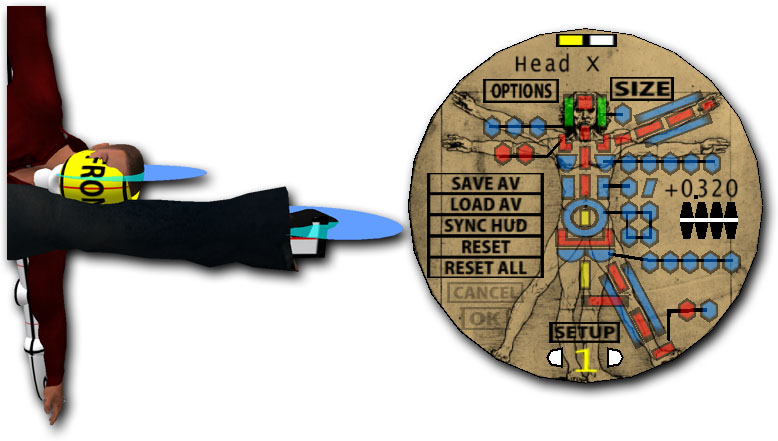
You may have to increase part of the Mannequin's head to see the line running down the center of the face. Click the blue button around the head which is Head X then increase it until you see the red line on the Mannequin's head.


Setup 1 - 3
Select the Root on the HUD. This moves the entire Mannequin up/down. Align the red line of the Mannequin's foot with the disk on the Avatar's foot.


Setup 1 - 4
Adjusting Hip Length moves the Mannequin's foot and head. Adjust until red lines on the head and foot are offset equally from the two disks.


Setup 1 - 5
Select Root and adjust so both lines are aligned with the head and foot disk. Continue to setup 2.


NEXT

©Copyright 2011 U-Poser. All rights reserved. No part of this document may be reproduced without permission of U-Poser creator. Second Life, SL, and inSL are trademarks of Linden Research, Inc. U-Poser is not affiliated with or sponsored by Linden Research. Mac and Mac OS are trademarks of Apple Inc., registered in the U.S. and other countries. Windows is a registered trademark of Microsoft Corporation in the United States and other countries. All products are trademarks of their respective companies. Specifications subject to change without notice.