U-Poser ® Reference and Help Guide

    Web Site Updated 2-19-2011
    Current U-Poser version 2.5.4


Home
Overview
Size/Shape
Pose
Pose Mannequin
Save
Create (Still) BVH File
Upload File
Load
Import
Misc
Player (Animation)
Options
Mannequin
Advanced
Downloads
Help
POSE >> UPLOAD FILE


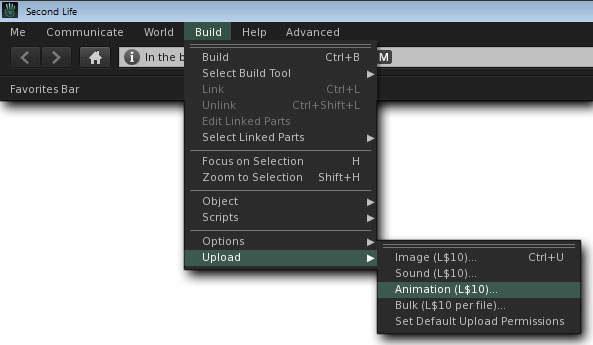
Please note these instructions were written for use with SL viewer 2. Third party viewers may appear different. Once a BVH file has been saved on your computer it may be uploaded to SL. In SL select Build>>Upload>>Animation(L$10) then select the file to upload.


A window will open allowing parameters to be set for the pose.
1)Set the priority level for the pose. Most default animations in SL have a priority level of 2 or lower. Higher priorities override lower priorities (highest priority being 4; lowest priority being 0). If two poses of the same priority are played the last pose will be displayed.
2) Check the box for Loop for a still pose.
3) In(%) and Out(%) is not used for a still pose.
4) Select desired Hand Pose.
5) Select desired Expression.
6) Preview animation with SL animation such as standing, walking, sitting, or flying.
7) Set Ease In (sec) to the amount of time for the Avatar to ease into the animation from current pose.
8) Set Ease Out (sec) to the amount of time for the Avatar to ease out of the animation when it ends.
9) Click the play button to preview the pose, if desired.
10) Click Upload (L$10).

©Copyright 2011 U-Poser. All rights reserved. No part of this document may be reproduced without permission of U-Poser creator. Second Life, SL, and inSL are trademarks of Linden Research, Inc. U-Poser is not affiliated with or sponsored by Linden Research. Mac and Mac OS are trademarks of Apple Inc., registered in the U.S. and other countries. Windows is a registered trademark of Microsoft Corporation in the United States and other countries. All products are trademarks of their respective companies. Specifications subject to change without notice.